
Issue #1010
A Better Way to Update UICollectionView Data in Swift with Diff Framework
Familiar Friends
It’s hard to imagine any apps that don’t use table view or collection view, via classes like UITableView, UICollectionView in iOS, tvOS or NSTableView, NSCollectionView in macOS. Most of the time, we fetch data from the backend, cache and filter to show that data as list or grid. And later, when data has changed, we update your interface to reflect that some items have been inserted or deleted.
That’s where your favorite function comes in, reloadData. This way the whole list is refreshed with completely new content. It’s fine for scenarios when you want a quick way to refresh content. But it makes the UITableView reinvalidate cell sizes again, which can reduce performance. Further if those changes should be noticeable, and you want to give users better understanding of what’s going on, then manually insert and delete of rows is preferred.
If you’re doing Android, you probably know that instead of calling notifyDataSetChanged, you can use the provided DiffUtil to calculate the changes for us, so that updating RecyclerView becomes easy. Unfortunately, you don’t have that luxury in iOS, but we can learn how to do it.
This guide uses UICollectionView as examples, but UITableView behaves the same. And to any of you searching for NSCollectionView on Google, it is just a bit harder:

Drag and Drop
Let’s see UICollectionView in action. Imagine an app where users are allowed to customise their experience by moving items from one collection to another.
You can take a look at the example DragAndDrop which is using the new drag and drop API in iOS 11.

You must ensure that your data is changed before calling update methods on UICollectionView. And then we call deleteItems and insertItems to reflect data changes. UICollectionView performs a nice animation for you.
func collectionView(_ collectionView: UICollectionView,
                    performDropWith coordinator: UICollectionViewDropCoordinator) {
  let destinationIndexPath = coordinator.destinationIndexPath ?? IndexPath(item: 0, section: 0)

  for item in coordinator.items {
    if let sourceIndexPath = item.sourceIndexPath {
      // Local drag
      collectionView.performBatchUpdates({
        // Update data source first
        let movedItem = items.remove(at: sourceIndexPath.item)
        items.insert(movedItem, at: destinationIndexPath.item)

        // Then update collection view
        collectionView.deleteItems(at: [sourceIndexPath])
        collectionView.insertItems(at: [destinationIndexPath])
      })
    }
  }
}
This is a trivial example, you just remove or add 1 item from a collection. But in real projects, the data is much more complex, the changes are not that trivial. If you have a large number of items with many insertions and deletions from backend response, you need to calculate the correct IndexPath to call, which are not an easy thing. Most the time you will get the following crashes:
NSInternalInconsistencyException
Terminating app due to uncaught exception 'NSInternalInconsistencyException',
reason: 'Invalid update: invalid number of items in section 0.
The number of items contained in an existing section after the update (213)
must be equal to the number of items contained in that section before
the update (154), plus or minus the number of items inserted or
deleted from that section (40 inserted, 0 deleted) and plus
or minus the number of items moved into or out of
that section (0 moved in, 0 moved out).'
In my experience it happened randomly because user has different data. Although the message is very descriptive, it may take a while to figure it out.
Game of IndexPath
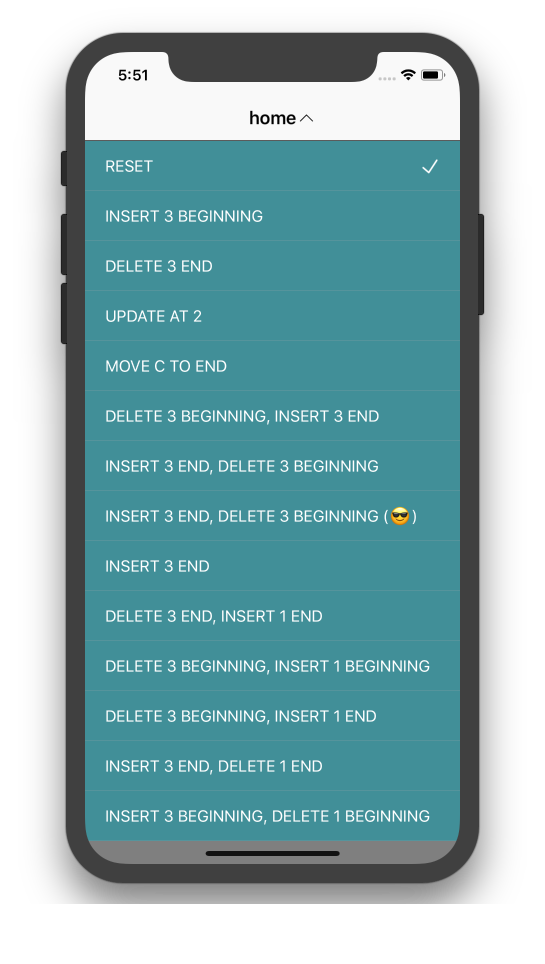
Let’s refine our knowledge of IndexPath by going through some examples. With a collection of 6 items, we perform some update operations and figure out what IndexPath should be.
items = ["a", "b", "c", "d", "e", "f"]
For a better understanding, take a look at more examples here: CollectionUpdateExample.

index vs offset
Before we go any further, I just want to mention that, by index I actually mean offset from the start. If you take a look at the enumerated function, it suggests the name as offset instead of index.
for (offset, element) in items.enumerated() {
  print("\(offset): \(element)")
}
This zero based numbering could shed some light on this matter:
Particularly in C, where arrays are closely tied to pointer arithmetic, this makes for a simpler implementation: the subscript refers to an offset from the starting position of an array, so the first element has an offset of zero.
Below are some examples showing a simple change to the collection, and the set of IndexPath we need to figure out. Remember that we need to update items array (which is our data source in this case), before we can call any update methods on UICollectionView.
1. Insert 3 items at the end
items = ["a", "b", "c", "d", "e", "f", "g", "h", "i"]
collectionView.insertItems(at: [
  IndexPath(item: 6, section: 0),
  IndexPath(item: 7, section: 0),
  IndexPath(item: 8, section: 0)
])
2. Delete 3 items at the end
items = ["a", "b", "c"]
collectionView.deleteItems(at: [
  IndexPath(item: 3, section: 0),
  IndexPath(item: 4, section: 0),
  IndexPath(item: 5, section: 0)
])
3. Update item at index 2
items = ["a", "b", "C", "d", "e", "f"]
collectionView.reloadItems(at: [IndexPath(item: 2, section: 0)])
4. Move item “c” to the end
items = ["a", "b", "d", "e", "f", "c"]
collectionView.moveItem(
  at: IndexPath(item: 2, section: 0),
  to: IndexPath(item: 5, section: 0)
)
5. Delete 3 items at the beginning, then insert 3 items at the end
With multiple different operations, we should use performBatchUpdates:
You can use this method in cases where you want to make multiple changes to the collection view in one single animated operation, as opposed to in several separate animations. You might use this method to insert, delete, reload, or move cells or use it to change the layout parameters associated with one or more cells.
items = ["d", "e", "f", "g", "h", "i"]
collectionView.performBatchUpdates({
  collectionView.deleteItems(at: [
    IndexPath(item: 0, section: 0),
    IndexPath(item: 1, section: 0),
    IndexPath(item: 2, section: 0)
  ])
  collectionView.insertItems(at: [
    IndexPath(item: 3, section: 0),
    IndexPath(item: 4, section: 0),
    IndexPath(item: 5, section: 0)
  ])
})
6. Insert 3 items at the end, then delete 3 items at the beginning
If you run the example 6, you will get a crash:
Terminating app due to uncaught exception
'NSInternalInconsistencyException',
reason: 'attempt to insert item 6 into section 0,
but there are only 6 items in section 0 after the update'
performBatchUpdates
It is because the way performBatchUpdates works. Take a look at the documentation:
Deletes are processed before inserts in batch operations. This means the indexes for the deletions are processed relative to the indexes of the collection view’s state before the batch operation, and the indexes for the insertions are processed relative to the indexes of the state after all the deletions in the batch operation.
No matter how we call insert or delete, performBatchUpdates always performs deletions first. So we need to call deleteItems and insertItems with the correct IndexPath if the deletions occur first.
items = ["d", "e", "f", "g", "h", "i"]
collectionView.performBatchUpdates({
  // Delete indices are relative to BEFORE the update
  collectionView.deleteItems(at: [
    IndexPath(item: 0, section: 0),
    IndexPath(item: 1, section: 0),
    IndexPath(item: 2, section: 0)
  ])
  // Insert indices are relative to AFTER deletions
  collectionView.insertItems(at: [
    IndexPath(item: 3, section: 0),
    IndexPath(item: 4, section: 0),
    IndexPath(item: 5, section: 0)
  ])
})
Operation
There are many operations on UICollectionView, and there are operations to update whole section as well. Take a look at Ordering of Operations and Index Paths.
Edit Distance
Doing these calculations by hand is quite tedious and error prone. We can build our own abstraction using some algorithms. The naive one is Wagner-Fischer algorithm which uses Dynamic Programming to tell the edit distance between two strings of characters.
Edit distance means the number of steps needed to change from one string to another. String is just a collection of characters, so we can generalise this concept to make it work for any collection of items. Instead of comparing character, we require items to conform to Hashable.
“kit” to “kat”
How can we transform form of the word “kit” to “kat”? What kinds of operations do we need to perform? You may tell “just change the letter i to a”, but this trivial example helps you understand the algorithm. Let’s get started.

Deletions
If we go from “kit” to an empty string “”, we need 3 deletions:

- “kit” -> "" = 3 deletions
- “ki” -> "" = 2 deletions
- “k” -> "" = 1 deletion
Insertions
If we go from an empty string "" to “kat”, we need 3 insertions:
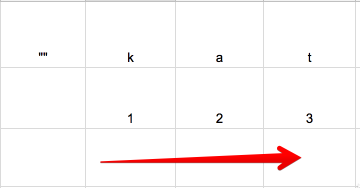
- "" -> “k” = 1 insertion
- "" -> “ka” = 2 insertions
- "" -> “kat” = 3 insertions
If equal, take value from the top left
You can think of the algorithm as if we go from source string, to empty string, to destination string. We try to find the minimum steps to update. Going horizontally means insertions, vertically means deletions and diagonally means substitutions.
This way we can build our matrix, iterate from row to row, column by column. First, the letter “k” from source collection is the same with letter “k” from destination collection, we simply take value from the top left, which is 0 substitution.

If not equal
We continue with the next letter from the destination collection. Here “k” and “a” are not the same. We take minimum value from left, top, top left. Then increase by one.

Here we take value from left, which is horizontally, so we increase by 1 insertion.
- “k” to “kat” = 2 insertions
Continue, “t” and “k” are not the same, so we take value from left horizontally. Here you can see it kind makes sense, as to go from “k” to “kat”, we need 2 insertions, which is to insert letters “a” and “t”.

The bottom right value
Continue with the next row, and the next row until we got to the bottom right value, which gives you the edit distance. Here 1 substitution means that we need to perform 1 substitution to go from “kit” to “kat”, which is update “i” with “a”.
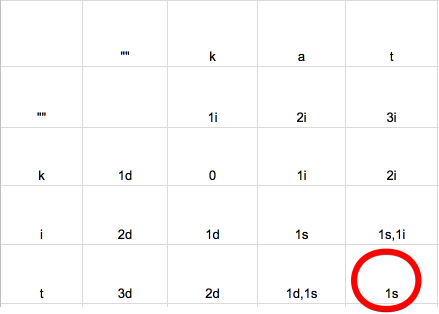
You can easily see that we need to update index 1. But how do we know that it is index 1?
DeepDiff
The algorithm shows the changes between 2 strings, but since string is just a collection of characters. We can generalise the concept to make it work for any collection of items.

The implementation of DeepDiff is on GitHub. Here is how it’s used. Given an old and new array, it computes the changes needed to transform. The changes consist of: type of change (insert, delete, replace, move) and the index of the change.
let old = ["a", "b", "c", "d", "e", "f"]
let new = ["a", "c", "d", "g", "h"]

let changes = diff(old: old, new: new)
// [delete(1), delete(4), delete(5), insert(3), insert(4)]
Code is the ultimate source of explanation. But in the next sections, I will outline some technical points in the library for you to easily follow.
Complexity
We iterate through the matrix, where m and n are the length of source and destination collection respectively. So we can see that the complexity of this algorithm is O(mn).
Also the performance greatly depends on the size of the collection and how complex the item is. The more complex and how deep you want to perform Equatable can greatly affect your performance.
If you take a look at the wiki page, there’s some hints on what we can do to improve performance:
“We can adapt the algorithm to use less space, O(m) instead of O(mn), since it only requires that the previous row and current row be stored at any one time.”
Seeing that we only operate one row at a time, it’s inefficient to store the whole matrix, instead we can just use 2 arrays to compute, and that also reduces the memory footprint.
Change
Since each kind of Change is mutual exclusive, they are perfect to be represented as enum:
public enum Change<T> {
  case insert(Insert<T>)
  case delete(Delete<T>)
  case replace(Replace<T>)
  case move(Move<T>)
}
- insert: The item was inserted at an index
- delete: The item was deleted from an index
- replace: The item at this index was replaced by another item
- move: The same item has moved from this index to another index
Using 2 rows
As said, we only need to keep track of 2 rows at a time to operate. Each slot in a row is a collection of changes. Here diff is a generic function that accepts any collection of Hashable items, that includes strings.
public func diff<T: Hashable>(old: [T], new: [T]) -> [Change<T>] {
  var previousRow = Row<T>()
  previousRow.seed(with: new)
  var currentRow = Row<T>()

  // ...
}
I like to keep separation of concerns, so each row should manage state on its own. Start by declaring a Row object which holds an array of slots:
class Row<T> {
  var slots: [Slot<T>] = []
}

class Slot<T> {
  var changes: [Change<T>] = []
}
Recall in the algorithm that we go row by row, then column by column. So we use 2 loops:
for oldItem in old {
  for newItem in new {
    // Compare and update slots
  }

  previousRow = currentRow
  currentRow = Row<T>()
}
And our job is just to compare items in old and new arrays, and update the slots in Row object correctly.
Hashable vs Equatable
We need to be clever on equation check, as when objects are complex, the Equatable function can take time. We know that Hashable conforms to Equatable, and that 2 same objects have the same hash value. So if they don’t have same hash value, they are not equatable. The reversed is not guaranteed, but this is enough to reduce the number of calls to Equatable function.
func isEqual(oldItem: T, newItem: T) -> Bool {
  // Quick check using hash value first
  if oldItem.hashValue != newItem.hashValue {
    return false
  }
  // Only call == if hash values match
  return oldItem == newItem
}
The algorithms have some other little details, but you should take a look at the code, it tells you more.
How about the Move
By now you have notice we have just updated steps for insertions, deletions and replacement. Where’s the move? Turn out that’s it’s not difficult. A move is just a deletion following by insertion of the same item. You can take a look at the MoveReducer, it’s not very efficiently implemented, but at least it gives you some hints.
Inferring IndexPath for UICollectionView
With the changes array returned by DeepDiff, we can infer the required set of IndexPath to feed to UICollectionView to perform the updates.
The conversion from Change to IndexPath is pretty much self explanatory. You can take a look at UICollectionView extension.
extension UICollectionView {
  func reload<T: Hashable>(
    changes: [Change<T>],
    section: Int = 0,
    updateData: () -> Void,
    completion: ((Bool) -> Void)? = nil
  ) {
    let inserts = changes.compactMap { $0.insert }.map {
      IndexPath(item: $0.index, section: section)
    }
    let deletes = changes.compactMap { $0.delete }.map {
      IndexPath(item: $0.index, section: section)
    }
    let replaces = changes.compactMap { $0.replace }.map {
      IndexPath(item: $0.index, section: section)
    }
    let moves = changes.compactMap { $0.move }.map { move in
      (from: IndexPath(item: move.fromIndex, section: section),
       to: IndexPath(item: move.toIndex, section: section))
    }

    // Important: reload items outside of performBatchUpdates
    reloadItems(at: replaces)

    performBatchUpdates({
      updateData()
      deleteItems(at: deletes)
      insertItems(at: inserts)
      moves.forEach { moveItem(at: $0.from, to: $0.to) }
    }, completion: completion)
  }
}
There’s one thing to notice, otherwise you will get the familiar 'NSInternalInconsistencyException'. That is to call reloadItems outside the performBatchUpdates. It is because the Replace step returned by this algorithm contains IndexPath of the state after collection are updated, but UICollectionView expects them to be before that state.
Other than that it’s pretty straightforward. You can go to the example to be amazed by how fast and informative it is about the changes.
Where to go from here
When finishing this guide, you know how to do manual update to UICollectionView through manual computation of IndexPath. After struggling with exceptions, you know how such help from a library is preferred. You also know algorithm and how to implement it in pure Swift. You also know how Hashable and Equatable are used.
The current version of DeepDiff now uses Heckel algorithm, which runs in linear time and performs a lot faster. You can take a look at the benchmark here:

IGListKit also implements that Heckel algorithm, but in Objective C++ and optimises it a lot. In the next article, I will write about Heckel algorithm and how to implement it in pure Swift, also how to write unit test for these diff algorithms. Stay tuned!
In the mean time, if you feel adventurous, here are some other algorithms that are said to be very performant:
Start the conversation